Powering the Next Camera: A Practical PoE Headroom Audit for UK Sites
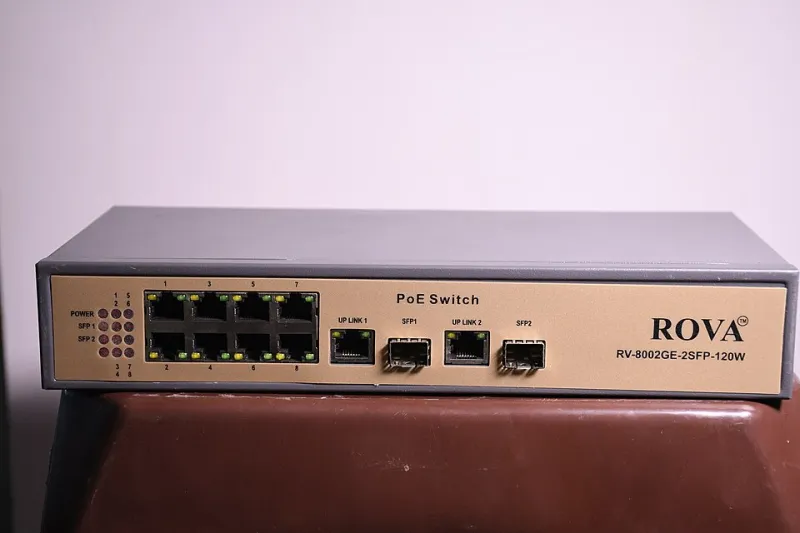
Photo: Bkvrova, CC BY-SA 4.0, via Wikimedia Commons
Adding a camera is rarely a one-device decision. In 2026, the devices themselves are more demanding: 4K sensors, varifocal lenses, IR illuminators, heaters, wipers and on-board analytics all draw from the same switch. The commercial pressure is familiar — the client wants one more view of the yard, the till queue or the corridor — but the electrical reality is less accommodating. The PoE budget trap is not a failure of the standard. It is a failure to audit the site.
The datasheet budget is not the installed budget
A switch may be advertised as having a 370 W PoE budget, but that figure is rarely a site-ready number. It is a laboratory condition. In a UK comms cabinet or ceiling void, the usable budget is reduced by ambient temperature, cable length, cable gauge, port reservation behaviour and start-up inrush. Some switches reserve power per port according to the PoE class, whether or not the device ever draws that much. Others enforce a total budget with little margin for simultaneous start-up after a power cut. The result is a system that passes a spot check at midday and fails when the heaters kick in on a January morning.
Start with three figures: the switch total PoE budget, the per-port maximum and the power reservation model. Then compare them with the actual powered device draw, not the marketing class. An 802.3at camera may be described as 30 W, but its steady-state draw might be 12 W and its peak with IR and heater might be 25 W. A PTZ with a heater can exceed both. If the switch reserves 30 W per port for that device, the budget is consumed by reservation, not by real load.
Cable length, voltage drop and the 100 m rule
PoE is often treated as plug-and-play up to 100 m. In practice, 100 m is the channel limit, not a guarantee of adequate voltage at the device. Voltage drop rises with current and cable resistance. A 15 W device on a 90 m run is usually comfortable. A 60 W device on the same run, especially over 24 AWG cable, is not. The powered device may brown out, reboot or negotiate a lower class. Installers then blame the camera firmware when the real issue is copper.
For higher-power 802.3bt devices, check the cable schedule before the switch schedule. If the run is close to the limit, use a shorter copper run to a local IDF, fibre back to the core, or a locally powered device where the standard and site rules allow it. Do not assume a PoE extender solves the problem: it consumes budget and adds another heat source.
Worked example: retail park
A retail park has a 24-port switch with a 370 W budget. Sixteen fixed cameras draw an average of 10 W each, and four PTZs draw 28 W each with heaters active. The steady load is 160 W plus 112 W, or 272 W, plus roughly 15 W for switch overhead. That leaves about 83 W of headline headroom. The temptation is to add four more 12 W cameras. On paper, 48 W fits.
In practice, the switch may reserve 30 W for each PTZ port and 15.4 W for each fixed port. That reservation model produces a reserved load above 370 W before the new cameras are added. The installation may work in mild weather and fail on a cold start. The sensible response is a second switch for the additional cameras, or local power for the PTZ heaters if the design permits. The client should be told that the extra cameras are not the problem; the power domain is.
Worked example: logistics site
A distribution centre wants 12 PTZs at 60 W and 20 fixed cameras at 15 W. The raw arithmetic is 720 W plus 300 W, or just over 1 kW. That is not a single-switch conversation. It is a power-domain design. Long runs from a central comms room may also exceed acceptable voltage drop at 60 W. The better design is usually fibre to distributed IDFs, with local PoE switches close to the camera clusters.
Thermal load matters here too. An unventilated ceiling void above a loading bay can reach 40°C or more in summer. The switch may derate its PoE budget, and the cameras may derate their own performance. A thermal survey is not a luxury on a logistics site; it is part of the electrical design.
Worked example: education campus
A further education college has a distributed switch in a ceiling void serving a teaching block. The existing load is 280 W on a 370 W switch. A new wing needs eight cameras at 12 W each, or 96 W. The total would be 376 W, which exceeds the budget even before any 20% headroom is applied. With a sensible headroom target, the requirement is closer to 450 W. The correct answer is a new switch or a new power domain, not a bigger number in the quotation.
What a proper audit should record
A PoE audit should capture the switch model, firmware, total budget, per-port maximum, reservation behaviour, current load, peak load, cable length and gauge, ambient temperature, enclosure type, UPS coverage and spare capacity. Apply a headroom margin of at least 20% for planned growth and start-up. Record which ports are reserved for PTZs, heaters and illuminators. Then test a cold start with all devices connected, not a warm reboot after lunch.
The marketing problem
Vendors often quote total wattage and camera count as if every site were the same. They are not. A switch that cannot start all cameras after a power cut is not a budget; it is a single point of failure. Trade buyers should ask for derating curves, per-port reservation details and cable assumptions before accepting a headline figure. If the answer is only a wattage number, the audit has not been done.
The disciplined approach is simple: audit the power domain before adding the device. The camera is the visible purchase; the switch, cable and enclosure are the installation. On UK sites, those are the parts that decide whether the system survives the winter.